November 5, 2026
November Tiger Talk Newsletter
TCE Tiger Talk Newsletter November 2026 November 4, 2026 Every Tiger. Every Day. The Dish with Dills As we head into November, I’m feeling especially thankful for the opportunity we have to pour in...

Our Mission
Always Learning
Always Safe and Positive
Always Supporting Others
#TCEtogether
Vision Statement
We believe the best way to achieve the mission of our school is through mutual respect and collaboration with our community, faculty, staff, parents, and students. Through collaboration we;
Ensure needs of the whole child are met
Commit to the academic success of each student
Unite to achieve the common purpose of growth and learning at high levels with a solid foundation in reading, writing, and math
Collectively support each other through collaborative teams
Monitor student progress on a frequent basis with current data
Our Collective Commitments:
In order to achieve our shared vision, Tiger Creek Elementary faculty and staff have made the following collective commitments.
We will work as positive, contributing members and communicate effectively.
We will study, and clarify pacing of curriculum.
We will guarantee a viable curriculum for all students.
We will monitor student learning and give timely feedback.
We will utilize instructional strategies that will guide, engage, and challenge.
We will use individual and small group learning.
We will provide timely information and resources for parents.
We will create and maintain positive relationships with students, parents, community, and all staff.
We will utilize available resources to meet the needs of the whole child.
Our Schoolwide Goals:
To create independent, critical thinkers and problem solvers
To provide a clean, safe, and positive environment
To improve student achievement
Recently, WDEF Channel 12 News visited Tiger Creek to showcase the Literacy Leader, Math Leader & John Hancock awards that we recently received. Several other CCPS schools received one or two of these awards but we were the only school in the county that received all 3! Click below to watch the WDEF Channel 12 segment!
Stay up to date on exciting news, events and more with the ParentSquare app!
November 5, 2026
TCE Tiger Talk Newsletter November 2026 November 4, 2026 Every Tiger. Every Day. The Dish with Dills As we head into November, I’m feeling especially thankful for the opportunity we have to pour in...
November 4, 2026
Please click below for the Title 1 Family Connection Fall Newsletter:

November 2, 2026
Catoosa County Public Schools: Superintendent's November 2026 Newsletter The book The Courage to Be Disliked recounts the ancient legend of the Gordian Knot. King Gordias had tethered an ox-cart to...

November 1, 2026
What's Up at The CreekNovember 2nd-6thNewsletter will be out soon! Here is the menu for Monday & TuesdayOur November Tiger Talk Newsletter will be out sometime on Monday evening or by Tuesday m...
October 29, 2026
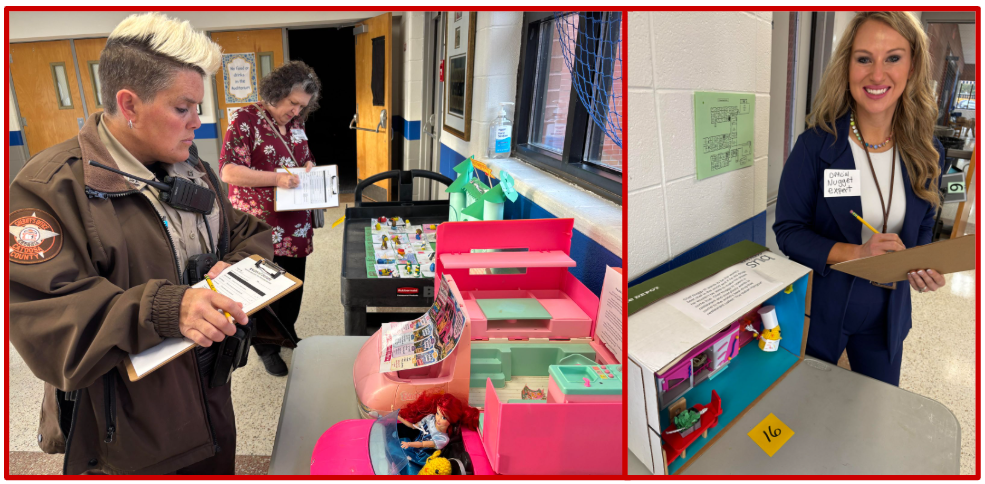
Red Ribbon Week at Tiger Creek featured Nuggies not Druggies displays of chicken nuggets living their best life designed by TCE homerooms. The crocheted nuggets were provided by Vickie Cornell of t...

October 26, 2026
What's Up at The CreekOctober 26th-30thTCE Spelling Bee - October 27thOur annual spelling bee will be this Tuesday, October 27th starting at 8:30am. Several of our Fourth & Fifth grade students...

October 20, 2026
Dear Parents or Grandparents,If you are helping to raise your grandchildren, we have a monthly group for you. The Catoosa County Family Collaborative is offering a monthly class that will meet and ...